【阅读笔记】rocketmq 消息存储 (四)

分析 rocketmq 的如何实现消息的存储

简介

store 模块定义了 rocketmq 如何将消息存储在文件系统。只要消息被刷盘持久化至磁盘文件中,那么 Producer 发送的消息就不会丢失,而 Consumer 也就肯定有机会去消费这条消息。

消息存储的层次结构
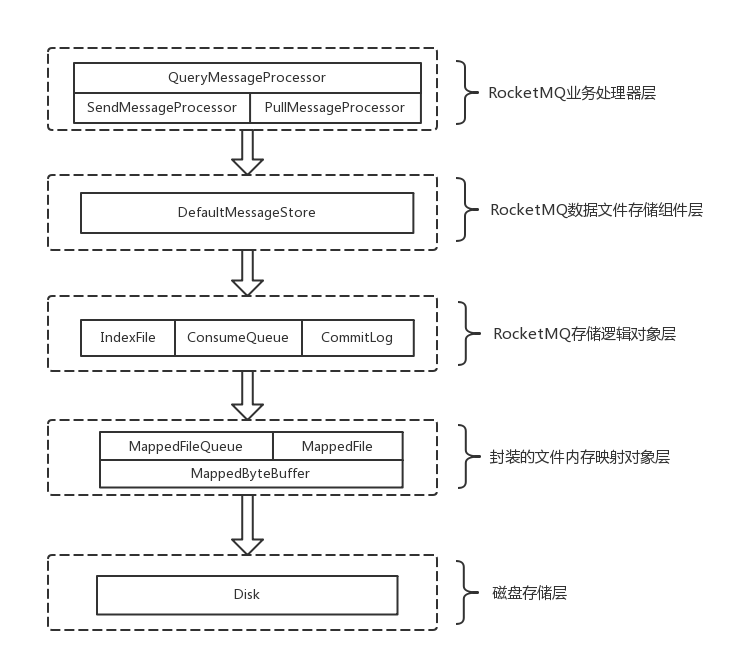
rocketmq 存储结构

rocketmq 文件存储模型层次结构如上图所示,概念上可以分为 5 层:

  1. rocketmq 业务处理器层,是 Broker 端对消息进行读取和写入的业务逻辑入口
  2. rocketmq 数据存储组件层,主要是 rocketmq 的存储核心类 DefaultMessageStore,为 rocketmq 消息数据文件的访问入口
  3. rocketmq 存储逻辑对象层,主要是三个模型类 IndexFile、ConsumerQueue 和 CommitLog
  4. 封装的文件内存映射层,采用 NIO 中的 MappedByteBuffer 和 FileChannel 完成数据文件读写
  5. 磁盘存储层,部署 rocketmq 服务器所用的磁盘

rocketmq 消息存储格式

存储逻辑对象层说明:

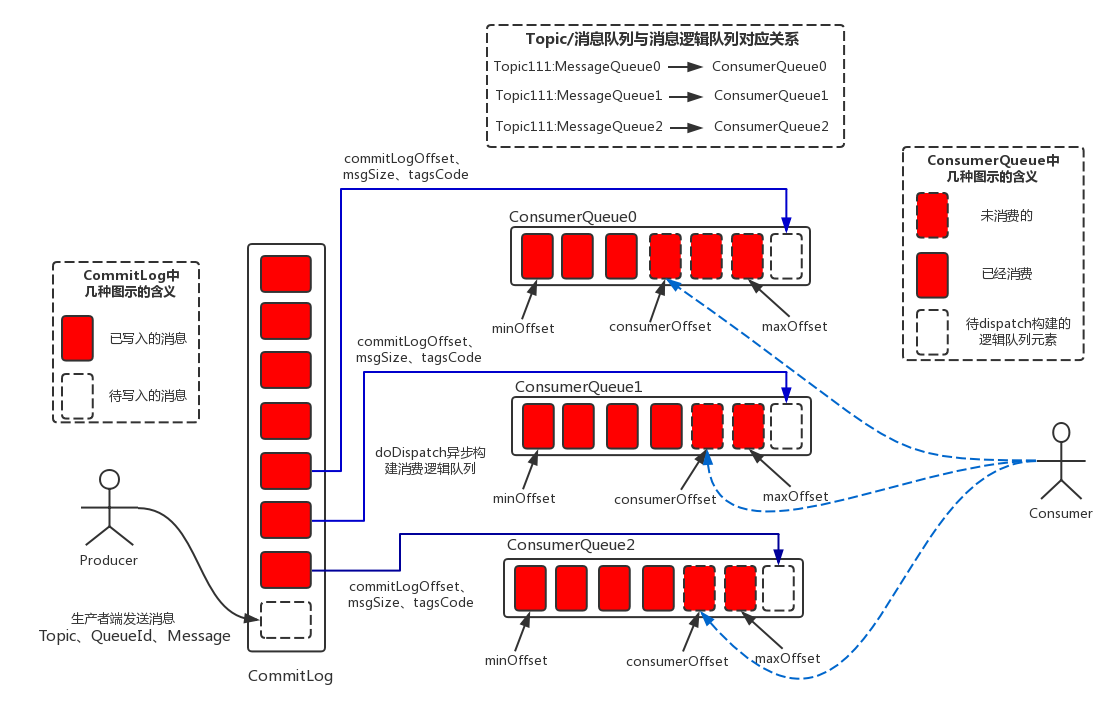
  1. 单个 broker 的所有消息都保存在 commit log 文件
  2. 生产者发送消息到 broker,broker 先写到 commit log
  3. 将消息在 commit log 在的位置记录到 consume queue(逻辑消费队列)
    consume queue 维护了 3 个变量:
    minOffset 表示 consume queue 中是早一个消息的逻辑下标
    consumerOffset 表示目前消费到的逻辑下标(保存在 consumerOffset),
    maxOffset 表示新消息在 consume queue 中的逻辑下标
  4. 消费者消费消息时,是按顺序从 consume queue 得到消息的存储位置,然后到 commit log 中取消息内容
  5. consume queue 按 Topic 组合,每个 Topic 下有多个 consume queue
  6. index 文件提供快速查找消息的方法,而且通过 index 文件来找消息不影响消息的消费

对于 consume queue, 采用顺序读写,速度较快,而 commit log 写入时是顺序写入,读取进是随机读取,读的效率偏低。
消费一条消息需要先读 consume queue 再读 commit log,有一定的开销

CommitLog 格式

用于保存消息,默认保存在 store/commitlog 目录下,每个文件都是 1GB,按顺序保存消息。

文件名每个都是 20 位,左边补0。第一个文件文件名是 00000000000000000000,起始位置的逻辑位置是 0,即偏移量是0。当第一个文件写满后,第二个文件文件名是 00000000001073741824(1G),起始位置的逻辑位置是 1073741824,即当要查找 commitLog 第 1073741825 的位置时,就读第二个文件的第 1 个字节,由此类推。

CommitLog 的内部类 MessageExtBatchEncoder 定义怎么将消息体变成字节流,DefaultAppendMessageCallback 的 doAppend 定义怎么将流读到消息体。一个消息包括以下内容:

序号 字段简称 字段大小(字节),类型 字段含义
1 TOTALSIZE 4,Integer 消息总长度
MAGICCODE 4,Integer 魔术数,CommitLog. MESSAGE_MAGIC_CODE
BODYCRC 4,Integer 消息体CRC
QUEUEID 4,Integer
5 FLAG 4,Integer
QUEUEOFFSET 8,Long
PHYSICALOFFSET 8,Long 消息在commitLog中的物理起始地址偏移量
SYSFLAG 4,Integer
BORNTIMESTAMP 8,Long 消息产生时间戳
10 BORNHOST 8,byte buffer 消息生产者地址, IP:Port
STORETIMESTAMP 8,Long 消息在 broker 的时间戳
STOREHOSTADDRESS 8,byte buffer 消息存储到broker的地址,IP:Port
RECONSUMETIMES 4,Integer
Prepared Transaction Offset 8,Long
15 BODY LENGTH 4,Integer BODY 的长度
BODY BODY LENGTH
TOPIC LENGTH 1,byte TOPIC 的长度
TOPIC TOPIC LENGTH
PROPERTIES LENGTH 2,Short PROPERTIES 的长度
20 PROPERTIES PROPERTIES LENGTH 消息的属性

ConsumeQueue

默认保存在 store/consumequeue/${Topic}/${queueid} 目录下,每个文件都是 600 万字节(5.7MB)

文件名每个都是 20 位,左边补 0,第一个文件文件名是 00000000000000000000, 与 CommitLog 的规则类似

每个 entry 包含如下内容:

序号 字段简称 字段大小(字节),类型 字段含义
1 offset 8,Long
size 4,Integer
tagsCode 8,Long

Index

记录某个 key 在 commit log 中的位置。索引文件由头,hashSlot,和 index 组成。

文件头包括有如下字段

序号 字段简称 字段大小(字节),类型 字段含义
1 beginTimestamp 8,Long
endTimestamp 8,Long
beginPhyOffset 8,Long
endPhyOffset 8,Long
5 hashSlotCount 4,Integer
indexCount 4,Integer 索引的数量

一个 hashSlot 占 4 字节,一共有 hashSlotNum 个(在 MessageStoreConfig.maxHashSlotNum 配置项定义)。一个 hashSlot 的值表示这个 hash 值的 index 的下标
index 有如下字段

序号 字段简称 字段大小(字节),类型 字段含义
1 keyHash 4,Integer 散列值
phyOffset 8,Long 消息 在 commit log 中的位置
timeDiff 4,Integer storeTimestamp 到 beginTimestamp 的差
slotValue 4,Integer hashSlot 的旧值,表示同样 hash 值的 index 的下标,相当于链表的 pre 指针。用拉链法解决 hash 冲突

消息存储的底层技术

内存映射文件

将文件内容映射到内存中,这里的映射是硬盘上文件的位置与进程逻辑地址空间的一一对应,然后文件的读写通过访问这段内存实现,这样就减少了 read / write 等系统调用。

使用 read / write 等系统调用,读操作的话操作系统先将文件的内存加载到内核空间,再复制到用户进程空间;写操作的话会先将用户进程空间复制到内核空间再写入磁盘。内存映射文件技术减少了这些中间操作,从而提升效率。

java 中通过 FileChannel 的 map 成员方法可以打开内存映射文件

PageCache 以及文件预热

系统的所有文件 I/O 请求,操作系统都是通过 page cache 机制实现的。对于操作系统来说,磁盘文件都是由一系列的数据块顺序组成,数据块的大小由操作系统本身而决定,x86 的 linux 中一个标准页面大小是 4KB。

操作系统内核在处理文件 I/O 请求时,首先到 page cache 中查找(page cache 中的每一个数据块都设置了文件以及偏移量地址信息),如果未命中,则启动磁盘 I/O,将磁盘文件中的数据块加载到 page cache 中的一个空闲块,然后再 copy 到用户缓冲区中。

page cache 本身也会对数据文件进行预读取,对于每个文件的第一个读请求操作,系统在读入所请求页面的同时会读入紧随其后的少数几个页面。因此,想要提高 page cache 的命中率(尽量让访问的页在物理内存中),从硬件的角度来说肯定是物理内存越大越好。从操作系统层面来说,访问 page cache 时,即使只访问 1k 的消息,系统也会提前预读取更多的数据,在下次读取消息时, 就很可能可以命中内存。

每当创建一个新的 commit log 内存映射文件,rocketmq 会每隔 4k 写入一个 0,使得整个文件都会加载到内存,然后用 mlock 锁定内存。这样 commit log 的读写都会通过内存进行,可以有效提高消息的 I/O 效率。

LibC 系统调用

利用 JNA 加载 C Runtime 库,并调用其中的 API

1
2
3
4
5
6
7
8
9
10
11
12
13
14
15
16
17
public interface LibC extends Library {
LibC INSTANCE = (LibC) Native.loadLibrary(Platform.isWindows() ? "msvcrt" : "c", LibC.class);

...

// 锁定系统物理内存,防止被系统换出
int mlock(Pointer var1, NativeLong var2);

// 解锁
int munlock(Pointer var1, NativeLong var2);

// 告诉内核如何使用某些映射或共享内存区域
int madvise(Pointer var1, NativeLong var2, int var3);
}

// 调用方式
LibC.INSTANCE.mlock(var1, var2);

消息存储的功能实现

MappedFile & MappedFileQueue

MappedFile 操作内存映射文件,负责用内存映射的方式读写文件。 MappedFile 继承了 ReferenceResource,ReferenceResource 采用引用计数的方式管理资源。

MappedFile 有两种工作方式,由 MessageStoreConfig.isTransientStorePoolEnable 配置项控制

当 MessageStoreConfig.isTransientStorePoolEnable 为 true 时,MappedFile 在 init 会传入 TransientStorePool 对象,并从中取出 ByteBuffer 给 writeBuffer 成员赋值;当 MessageStoreConfig.isTransientStorePoolEnable 为 false 时则不传入

当 writeBuffer 非空时,就使用 writeBuffer 进行读写,否则使用 mappedByteBuffer 进行读写

主要区别是 flush 和 commit 方法不同:

  1. 使用 writeBuffer,读写操作其实是先写到另外的 byteBuffer,而不是文件映射到的 mappedByteBuffer
    commit 将 writeBuffer 写入 fileChannel
    flush 方法调用 fileChannel 的 force,强制将 fileChannel 所有更新写入存储设备,因为这时不使用 mappedByteBuffer 读写,所以不用管 mappedByteBuffer
  2. 使用 mappedByteBuffer
    commit 方法什么都不做
    flush 方法调用 mappedByteBuffer 的 force,强制 mappedByteBuffer 的所有更新写入到存储设备

因为 MappedFile 总是多个出现,例如 commit log 就由多个文件组成,所以用列表组织起来,并提供服务。所有对 MappedFile 的操作其实都要经过 MappedFileQueue。

MappedFileQueue 的主要成员有

1
2
3
4
5
6
7
8
9
10
11
12
13
14
15
16
17
18
19
20
21
22
23
24
25
26
27
28
29
30
31
32
33
34
35
36
37
38
39
40
41
42
43
44
45
46
47
48
49
50
51

public class MappedFileQueue {
...
String storePath; // 文件保存路径

CopyOnWriteArrayList<MappedFile> mappedFiles; // 保存多个 MappedFile

AllocateMappedFileService allocateMappedFileService; // 用于创建新的 MappedFile 并给 MappedFile 预热

long flushedWhere; // 记录已经 flush 的位置

long committedWhere; // 记录已经 commit 的位置

...

// 加载 storePath 下的所有文件
public boolean load() {
...
}

// 获取 startOffset 位置的 MappedFIle 对象
public MappedFile getLastMappedFile(final long startOffset, boolean needCreate) {
...
}

// 获取 mappedFiles 中最后一个 MappedFile 对象
public MappedFile getLastMappedFile() {
MappedFile mappedFileLast = null;

// 由于 size 之后可能被其他线程修改,所以要循环读取,并 catch IndexOutOfBoundsException 异常
while (!this.mappedFiles.isEmpty()) {
try {
mappedFileLast = this.mappedFiles.get(this.mappedFiles.size() - 1);
break;
} catch (IndexOutOfBoundsException e) {
//continue;
} catch (Exception e) {
log.error("getLastMappedFile has exception.", e);
break;
}
}

return mappedFileLast;
}

// 删除过期的文件,防止过多占用空间
public void truncateDirtyFiles(long offset) {
...
}

}

commit log

CommitLog 类实现了对 commit log 文件的读写。 CommitLog 文件保存在 ${storePath}/commitlog/ 目录下。

1
2
3
4
5
6
7
8
9
10
11
12
13
14
15
16
17
18
19
20
21
22
23
24
25
26
27
28
29
30
31
32
33
34
35
36
37
38
39
40
41
42
43
44
45
46
47
48
49
50
51
52
53
54
55
56
57
58
59
60
61
62
63
64
65
66
67
68
69
70
71
72
73
74
75
76
77
78
79
80
81
82
83
84
85
86
87
88
89
90
91
92
93
94
95
96
97
98
99
100

public class CommitLog {

...

MappedFileQueue mappedFileQueue; // 读写 mappedFiles

FlushCommitLogService flushCommitLogService; //

FlushCommitLogService commitLogService; //

AppendMessageCallback appendMessageCallback; // 用于写 meesage

...

// 读数据

// 将逻辑位置 offset 后的内容读出
// SelectMappedBufferResult 封装了一个 ByteBuffer,可以直接表示读出的内容,不需要做复制操作
public SelectMappedBufferResult getData(final long offset, final boolean returnFirstOnNotFound) {

// 一个文件的大小
int mappedFileSize = this.defaultMessageStore.getMessageStoreConfig().getMapedFileSizeCommitLog();

// 定位到 offset 所在的 MappedFile
MappedFile mappedFile = this.mappedFileQueue.findMappedFileByOffset(offset, returnFirstOnNotFound);
if (mappedFile != null) {
int pos = (int) (offset % mappedFileSize); // pos 就是 offset 在 MappedFile 中的实际位置
SelectMappedBufferResult result = mappedFile.selectMappedBuffer(pos);
return result;
}

return null;
}

...

// 顺序写消息
PutMessageResult putMessage(final MessageExtBrokerInner msg) {
...

if (tranType == MessageSysFlag.TRANSACTION_NOT_TYPE || tranType == MessageSysFlag.TRANSACTION_COMMIT_TYPE) {
if (msg.getDelayTimeLevel() > 0) { // 处理延时投递
...
topic = ScheduleMessageService.SCHEDULE_TOPIC; // 先将消息写到 SCHEDULE_TOPIC_XXXX 这个 topic
queueId = ScheduleMessageService.delayLevel2QueueId(msg.getDelayTimeLevel());
..
}
}

long eclipseTimeInLock = 0;
MappedFile unlockMappedFile = null;
MappedFile mappedFile = mappedFileQueue.getLastMappedFile(); // 最后一个 MappedFile

putMessageLock.lock(); // 这个锁有 ReentrantLock 和用 AtomicBoolean 实现的自旋锁两种实现,取决于配置
try {
...

/* 通过 appendMessageCallback 写消息
appendMessage 为 appendMessageCallback 提供一个 byteBuffer 参数
这个 byteBuffer 决定了写到哪个内存(writeBuffer or mappedByteBuffer)

appendMessageCallback 使用 DefaultAppendMessageCallback 实现,它前面提到的格式将消息写到 byteBuffer
*/
result = mappedFile.appendMessage(msg, appendMessageCallback);
switch (result.getStatus()) {
... 构造 PutMessageResult
}

eclipseTimeInLock = this.defaultMessageStore.getSystemClock().now() - beginLockTimestamp;
beginTimeInLock = 0;
} finally {
putMessageLock.unlock();
}

..

// 处理刷盘
handleDiskFlush(result, putMessageResult, msg);

// 处理 HA
handleHA(result, putMessageResult, msg);

return putMessageResult;
}

// 写批量消息与写单个消息类似

// 直接写数据,这是 slave 写数据时用的
public boolean appendData(long startOffset, byte[] data) {
putMessageLock.lock();
try {
MappedFile mappedFile = this.mappedFileQueue.getLastMappedFile(startOffset);
...
return mappedFile.appendMessage(data);
} finally {
putMessageLock.unlock();
}
}
}

同步刷盘 VS 异步刷盘

handleDiskFlush 处理磁盘的刷新。当使用同步方式时,commit log 写到磁盘后,putMessage 才返回;当使用异步方式时,commit log 写到内存就返回,由专门的线程将内存刷新到磁盘。

1
2
3
4
5
6
7
8
9
10
11
12
13
14
15
16
17
18
19
20
21
22
23
24
25
26
27
28
29
30
31
32
33
34
35
36
37
38
39
40
41
42
43
44
45
46
47
48
49
50
51
52
53
54
55
56
57
58
59
60
61
62
63
64
65
66
67
68
69
70
71
72
73
74
75
76
77
78
79
80
81
82
83
84

// 所有的刷盘动作,都是调用 MappedFileQueue 的 flush 方法实现

public void handleDiskFlush(AppendMessageResult result, PutMessageResult putMessageResult, MessageExt messageExt) {
// Synchronization flush
if (FlushDiskType.SYNC_FLUSH == this.defaultMessageStore.getMessageStoreConfig().getFlushDiskType()) {

final GroupCommitService service = (GroupCommitService) this.flushCommitLogService;

if (messageExt.isWaitStoreMsgOK()) { // 消息可以加一个属性,使得不用同步方式刷盘

// 同步方式刷盘,创建一个刷盘的请求,然后等待刷盘完成
// 使用同步方式时,flushCommitLogService 是 GroupCommitService 类对象
GroupCommitRequest request = new GroupCommitRequest(result.getWroteOffset() + result.getWroteBytes());

// GroupCommitService 有两个队列,requestsWrite 和 requestsRead
// putRequest 会将 request 添加到 requestsWrite 并使用线程开始运行
service.putRequest(request);

// GroupCommitRequest 内部有一个 CountDownLatch, waitForFlush 方法调用 countDownLatch.await
boolean flushOK = request.waitForFlush(this.defaultMessageStore.getMessageStoreConfig().getSyncFlushTimeout());

if (!flushOK) {
... // 报错
}
} else {
service.wakeup(); // 仅唤醒线程
}
}
// Asynchronous flush
else {
// 仅唤醒线程
// 如果使用 isTransientStorePoolEnable 的话,还需要 commit 再 flush,所以这里需要使用两个不同的线程实现刷盘
if (!this.defaultMessageStore.getMessageStoreConfig().isTransientStorePoolEnable()) {

// 在异步刷盘方式中,flushCommitLogService 是 FlushRealTimeService 类对象
// 这个线程每隔固定时间调用一次 mappedFileQueue.flush
flushCommitLogService.wakeup();
} else {

// CommitRealTimeService 每隔固定时间调用一次 mappedFileQueue.commit
// 然后唤醒 flushCommitLogService,让这个线程做 flush
commitLogService.wakeup();
}
}
}

class GroupCommitService extends FlushCommitLogService {

...

private void doCommit() {
synchronized (this.requestsRead) {
if (!this.requestsRead.isEmpty()) {
for (GroupCommitRequest req : this.requestsRead) {
...
CommitLog.this.mappedFileQueue.flush(0); // 刷盘,如果 req 中要求刷盘的位置已经刷过,就不用刷
...
req.wakeupCustomer(flushOK); // 通知到等待 req 的线程
}

...
requestsRead.clear();
} else {
CommitLog.this.mappedFileQueue.flush(0)
}
}
}

public void run() {
while (!this.isStopped()) {
...
this.waitForRunning(10);
this.doCommit();
...
}

...

doCommit(); // 正常的循环退出后还要再刷盘一次

...
}
}

HA(同步双写 VS 异步复制)

handleHA 实现 master 到 slave 的同步双写,如果是采用异步复制的方法,这个方法会直接返回

1
2
3
4
5
6
7
8
9
10
11
12
13
14
15
16
17
18
19
20
21
22
23
24
25
26
27
28
29
30
31
32
33
34

public void handleHA(AppendMessageResult result, PutMessageResult putMessageResult, MessageExt messageExt) {

// 判断是不是同步双写
if (BrokerRole.SYNC_MASTER == this.defaultMessageStore.getMessageStoreConfig().getBrokerRole()) {

// HAService 有个嵌套类 GroupTransferService
// GroupTransferService 检查是否已经写到 slave,写完成就通知正在等待的线程
// 同步双写仍然是通过 slave 往 master 读 commit log 来实现,这里的同步只不过是在 putMessage 中增加了等待,确保同步已经完成
HAService service = this.defaultMessageStore.getHaService();
if (messageExt.isWaitStoreMsgOK()) {

// 检查 slave 是否连接正常,且这个 req 对 slave 来说是不是 OK 的
if (service.isSlaveOK(result.getWroteOffset() + result.getWroteBytes())) {

// request & wait
GroupCommitRequest request = new GroupCommitRequest(result.getWroteOffset() + result.getWroteBytes());
service.putRequest(request);
service.getWaitNotifyObject().wakeupAll();
boolean flushOK = request.waitForFlush(this.defaultMessageStore.getMessageStoreConfig().getSyncFlushTimeout());

if (!flushOK) {
... 报错
}
}
// Slave problem
else {
... 报错
}
}
}

// 异步复制就直接返回
}

HA

HAService 类实现了 commit log 的 master-slave 同步。broker 启动时,会打开 listen + 2 的端口侦听来自其实 broker 的 HA 连接。master 可以同步到 slave, slave 也可以同步到其他 slave。

HA 服务使用原生 NIO 实现通信, 主要有几个部分组成

  • HAService:包装各个同步组件,主要有嵌套类来实现功能
    • AcceptSocketService: 侦听来自其他 broker 的连接请求,accept 后创建连接对象 HAConnection
    • GroupTransferService:检查数据是否已经写到 slave
    • HAClient:连接 master,连接建立后接收 master 发送的数据并写到 commit log,然后向 master 报告自己的 maxOffset,以便控制发送速度
  • HAConnection:显然由同步的源端使用,主要功能由嵌套类 ReadSocketService 和 WriteSocketService 实现
    • ReadSocketService: 接收来自 slave 报告的 maxOffset,并通知 GroupTransferService
    • WriteSocketService:从 commit log 中读数据并发送给 slave

master 相关代码

1
2
3
4
5
6
7
8
9
10
11
12
13
14
15
16
17
18
19
20
21
22
23
24
25
26
27
28
29
30
31
32
33
34
35
36
37
38
39
40
41
42
43
44
45
46
47
48
49
50
51
52
53
54
55
56
57
58
59
60
61
62
63
64
65
66
67
68
69
70
71
72
73
74
75
76
77
78
79
80
81
82
83
84
85
86
87
88
89
90
91
92
93
94
95
96
97
98
99
100
101
102
103
104
105
106
107
108
109
110
111
112
113
114
115
116
117
118
119
120
121
122
123
124
125
126
127
128
129
130
131
132
133
134
135
136
137
138
139
140
141
142
143
144
145
146
147
148
149
150

public class HAService {

...

List<HAConnection> connectionList = new LinkedList<>(); // 保持所有连接

...

class AcceptSocketService extends ServiceThread {

...

AtomicLong push2SlaveMaxOffset = new AtomicLong(0)

...

public void beginAccept() {
...
this.serverSocketChannel.socket().bind(this.socketAddressListen); // 打开侦听端口
...
}

// 更新 slave 已同步到的位置
// 将 push2SlaveMaxOffset 设置为 offset
public void notifyTransferSome(final long offset) {
// offset > push2SlaveMaxOffset 才需要更新,不能更新过后变小了
for (long value = this.push2SlaveMaxOffset.get(); offset > value; ) {
boolean ok = this.push2SlaveMaxOffset.compareAndSet(value, offset);
if (ok) {
this.groupTransferService.notifyTransferSome(); // ok 就通知线程
break;
} else {
value = this.push2SlaveMaxOffset.get(); // 不 ok 继续尝试更新
}
}
}

...

public void run() {
while (!this.isStopped()) {
try {
this.selector.select(1000);
Set<SelectionKey> selected = this.selector.selectedKeys();

if (selected != null) {
for (SelectionKey k : selected) {
if ((k.readyOps() & SelectionKey.OP_ACCEPT) != 0) { // ACCEPT 事件
SocketChannel sc = ((ServerSocketChannel) k.channel()).accept();

...

// 创建 HAConnection
HAConnection conn = new HAConnection(HAService.this, sc);
conn.start();
HAService.this.addConnection(conn);
}
}
}

} catch (Exception e) {
...
}
}
}
}

// 等待数据同步到 slave
class GroupTransferService extends ServiceThread {
...

private void doWaitTransfer() {
...

for (CommitLog.GroupCommitRequest req : this.requestsRead) {

// req.getNextOffset() 是期望要同步到的 offset
// push2SlaveMaxOffset 是已经同步到的 offset
// 每过 1 秒检比较一下 push2SlaveMaxOffset 和 req.getNextOffset(),最多比较 5 次
boolean transferOK = HAService.this.push2SlaveMaxOffset.get() >= req.getNextOffset();
for (int i = 0; !transferOK && i < 5; i++) {
this.notifyTransferObject.waitForRunning(1000);
transferOK = HAService.this.push2SlaveMaxOffset.get() >= req.getNextOffset();
}

if (!transferOK) {
log.warn("transfer messsage to slave timeout, " + req.getNextOffset()); // 不 OK 也没办法了, 日志告警
}

req.wakeupCustomer(transferOK); // 通知等待的线程
}

...
}
...
}
}


public class HAConnection {

class ReadSocketService extends ServiceThread {

private boolean processReadEvent() {
...
int readSize = this.socketChannel.read(this.byteBufferRead);
...
long readOffset = this.byteBufferRead.getLong(pos - 8);
...

HAConnection.this.slaveAckOffset = readOffset;
...

// 更新 HaService 的 push2SlaveMaxOffset
HAConnection.this.haService.notifyTransferSome(HAConnection.this.slaveAckOffset);

...
}

public void run() {
while (!this.isStopped()) {
try {
this.selector.select(1000);

processReadEvent();

...
} catch (Exception e) {
...
}

...
}
}
}

class WriteSocketService extends ServiceThread {
public void run() {

while (!this.isStopped()) {
}
}

// 每一次写的数据都包含 header 和 body TODO

}


}

slave 相关代码

1
2
3
4
5
6
7
8
9
10
11
12
13
14
15
16
17
18
19
20
21
22
23
24
25
26
27
28
29
30
31
32
33
34
35
36
37
38
39
40
41
42
43
44
45
46
47
48
49
50
51
52
53
54
55
56
57
58
59
public class HAService {

// 接收 master 发送的数据并写到 commit log
class HAClient extends ServiceThread {
...

public void run() {
while (!this.isStopped()) {
try {
if (this.connectMaster()) {
if (this.isTimeToReportOffset()) {
boolean result = this.reportSlaveMaxOffset(this.currentReportedOffset); // 向 master 报告当前的 offset,即写数据
...
}

this.selector.select(1000);

boolean ok = this.processReadEvent(); // 处理读到的数据

...
} else {
waitForRunning(1000 * 5); // 连接不 ok 就先等着
}
} catch (Exception e) {
...
}
}
}

private boolean processReadEvent() {
while (this.byteBufferRead.hasRemaining()) {
try {
int readSize = this.socketChannel.read(this.byteBufferRead);
if (readSize > 0) {
...
dispatchReadRequest(); // 读数据
...
} else (readSize == 0) {
...
} else {
...
}

} catch (IOException e) {
...
return false;
}
}

return true;
}

private boolean dispatchReadRequest() {
...
HAService.this.defaultMessageStore.appendToCommitLog(masterPhyOffset, bodyData); // 直接 append 数据到 commit log
...
}
}
}

consume queue

ConsumeQueue 记录消息在 CommitLog 中的位置,一个 ConsumeQueue 对象表示一个 Topic 下的一个队列。

ConsumeQueue 按 topic 和 队列 ID 保存在 ${storePath}/consumequeue/${topic}/${queueId} 目录下。

1
2
3
4
5
6
7
8
9
10
11
12
13
14
15
16
17
18
19
20
21
22
23
24
25
26
27
28
29
30
31
32
33
34
35
36
37
38
39
40
41
42
43
44
45
46
47
48
49
50
51
52
53
54
55
56
57
58
59
60
61
62
63
64
65
66
67

public class ConsumeQueue {
public static final int CQ_STORE_UNIT_SIZE = 20; // ConsumeQueue 中每一个条目长度是固定的 20

MappedFileQueue mappedFileQueue; // 读写内存映射文件
String topic; // topic
int queueId; // 队列 id
ConsumeQueueExt consumeQueueExt; // 保存额外的信息

...

/* 写完 commit log 后会异步触发这个调用
*/
public void putMessagePositionInfoWrapper(DispatchRequest request) {
...

boolean result = putMessagePositionInfo(request.getCommitLogOffset(), request.getMsgSize(), tagsCode, request.getConsumeQueueOffset());
if (result) {
this.defaultMessageStore.getStoreCheckpoint().setLogicsMsgTimestamp(request.getStoreTimestamp());
}
...
}

/* 将消息在 commit long 中的 offset 和 size 写到 consume queue
* @param offset 消息在 commit log 中的逻辑位置
* @param size 消息的大小
* @param tagsCode 消息的 tagsCode
*/
private boolean putMessagePositionInfo(final long offset, final int size, final long tagsCode, final long cqOffset) {
...

this.byteBufferIndex.flip();
this.byteBufferIndex.limit(CQ_STORE_UNIT_SIZE);
this.byteBufferIndex.putLong(offset);
this.byteBufferIndex.putInt(size);
this.byteBufferIndex.putLong(tagsCode);

final long expectLogicOffset = cqOffset * CQ_STORE_UNIT_SIZE;

// 找到对应的 MappedFile
MappedFile mappedFile = this.mappedFileQueue.getLastMappedFile(expectLogicOffset);
if (mappedFile != null) {

...

// 顺序写
return mappedFile.appendMessage(this.byteBufferIndex.array());
}
return false;
}

public SelectMappedBufferResult getIndexBuffer(final long startIndex) {
int mappedFileSize = this.mappedFileSize;

// 计算 offset
long offset = startIndex * CQ_STORE_UNIT_SIZE;

if (offset >= this.getMinLogicOffset()) {
MappedFile mappedFile = this.mappedFileQueue.findMappedFileByOffset(offset);
if (mappedFile != null) {
SelectMappedBufferResult result = mappedFile.selectMappedBuffer((int) (offset % mappedFileSize));
return result;
}
}
return null;
}
}

index

索引文件由 IndexFile 类封装读写,IndexService 负责提供服务

1
2
3
4
5
6
7
8
9
10
11
12
13
14
15
16
17
18
19
20
21
22
23
24
25
26
27
28
29
30
31
32
33
34
35
36
37
38
39
40
41
42
43
44
45
46
47
48
49
50
51
52
53
54
55
56
57
58
59
60
61
62
63
64
65
66
67
68
69
70
71
72
73
74
75
76
77
78
79
80
81
82
83
84
85
86
87
88
89
90
91
92
93
94
95
96
97
98
99
100
101
102
103
104
105
106
107
108
109
110
111
112
113
114
115
116
117
118
119
120
121
122
123
124
125
126
127
128
129
130
131
132
133
134
135
136
137
138
139
140
141
142
143
144
145
146
147
148
149
150
151
152
153
154
155
156
157
158
159
160
161
162
163
164
165
166
167
168
169
170
171
172
173
174
175
176
177
178
179
180
181
182
183
184
185
186
187
188
189
190
191
192
193
194
195
196
197
198
199
200
201
202
203
204
205
206
207
208
209
210
211
212
213
214
215
216
217
218
219
220
221
222
223
224
225
226
227
228
229
230
231
232
233
234
235
236
237
238
239
240
241
242
243
244
245
246
247
248
249
250
251
252
253
254
255
256
257
258
259
260
261
262
263
264
265
266
267
268
269
270
271
272
273
274
275
276
277
278
279
280
281
282
283
284
285
286
287
288
289
290
public class IndexService {

...
int hashSlotNum;
int indexNum;
ArrayList<IndexFile> indexFileList = new ArrayList<IndexFile>();
ReadWriteLock readWriteLock = new ReentrantReadWriteLock();
...

/**
* 查询 key 所表示的消息在 commit log 中的位置
* begin, end 表示一个时间范围
*/
public QueryOffsetResult queryOffset(String topic, String key, int maxNum, long begin, long end) {
// 保存消息在 commit log 中的位置, 由于一个 key 可能有多个结果,用 List 保存
List<Long> phyOffsets = new ArrayList<Long>(maxNum);

long indexLastUpdateTimestamp = 0;
long indexLastUpdatePhyoffset = 0;
maxNum = Math.min(maxNum, this.defaultMessageStore.getMessageStoreConfig().getMaxMsgsNumBatch());
try {
this.readWriteLock.readLock().lock();

if (!this.indexFileList.isEmpty()) {
for (int i = this.indexFileList.size(); i > 0; i--) {

// 迭代每个 index file
IndexFile f = this.indexFileList.get(i - 1);
boolean lastFile = i == this.indexFileList.size();
if (lastFile) {
indexLastUpdateTimestamp = f.getEndTimestamp();
indexLastUpdatePhyoffset = f.getEndPhyOffset();
}

// 这个 index 文件在时间范围内,在这个文件找 key
if (f.isTimeMatched(begin, end)) {
f.selectPhyOffset(phyOffsets, buildKey(topic, key), maxNum, begin, end, lastFile);
}

if (f.getBeginTimestamp() < begin) {
break;
}

if (phyOffsets.size() >= maxNum) {
break;
}
}
}
} catch (Exception e) {
log.error("queryMsg exception", e);
} finally {
this.readWriteLock.readLock().unlock();
}

return new QueryOffsetResult(phyOffsets, indexLastUpdateTimestamp, indexLastUpdatePhyoffset);
}

/* 写完 commit log 后会异步触发这个调用
*/
public void buildIndex(DispatchRequest req) {
IndexFile indexFile = retryGetAndCreateIndexFile();
if (indexFile != null) {
long endPhyOffset = indexFile.getEndPhyOffset();
DispatchRequest msg = req;
String topic = msg.getTopic();
String keys = msg.getKeys();
if (msg.getCommitLogOffset() < endPhyOffset) {
return;
}

// 事务控制有消息不索引
final int tranType = MessageSysFlag.getTransactionValue(msg.getSysFlag());
switch (tranType) {
case MessageSysFlag.TRANSACTION_NOT_TYPE:
case MessageSysFlag.TRANSACTION_PREPARED_TYPE:
case MessageSysFlag.TRANSACTION_COMMIT_TYPE:
break;
case MessageSysFlag.TRANSACTION_ROLLBACK_TYPE:
return;
}

if (req.getUniqKey() != null) {

// 有 uniqkey 就用 uniqkey 写索引
indexFile = putKey(indexFile, msg, buildKey(topic, req.getUniqKey())); // buildKey -> topic + "#" + key

if (indexFile == null) {
log.error("putKey error commitlog {} uniqkey {}", req.getCommitLogOffset(), req.getUniqKey());
return;
}
}

if (keys != null && keys.length() > 0) {
String[] keyset = keys.split(MessageConst.KEY_SEPARATOR); // KEY_SEPARATOR 是空格
for (int i = 0; i < keyset.length; i++) {
String key = keyset[i];
if (key.length() > 0) {

// 每个 key 写一条索引
indexFile = putKey(indexFile, msg, buildKey(topic, key));

if (indexFile == null) {
log.error("putKey error commitlog {} uniqkey {}", req.getCommitLogOffset(), req.getUniqKey());
return;
}
}
}
}
} else {
log.error("...");
}
}

// 写索引
private IndexFile putKey(IndexFile indexFile, DispatchRequest msg, String idxKey) {

// 写成功为止
for (boolean ok = indexFile.putKey(idxKey, msg.getCommitLogOffset(), msg.getStoreTimestamp()); !ok; ) {
log.warn("Index file [" + indexFile.getFileName() + "] is full, trying to create another one");

// 写满磁盘了
indexFile = retryGetAndCreateIndexFile();
if (null == indexFile) {
return null;
}

ok = indexFile.putKey(idxKey, msg.getCommitLogOffset(), msg.getStoreTimestamp());
}

return indexFile;
}

}


public class IndexFile {
int hashSlotSize = 4;
int indexSize = 20;
int invalidIndex = 0;

int hashSlotNum; // 槽的最大数量
int indexNum; // 索引最大数量

MappedFile mappedFile;
FileChannel fileChannel;
MappedByteBuffer mappedByteBuffer;
IndexHeader indexHeader; // 索引文件头

...

// 从索引文件查出一个索引
public void selectPhyOffset(final List<Long> phyOffsets, final String key, final int maxNum, final long begin, final long end, boolean lock) {
if (this.mappedFile.hold()) { // hold 住
int keyHash = indexKeyHashMethod(key);
int slotPos = keyHash % this.hashSlotNum;
int absSlotPos = IndexHeader.INDEX_HEADER_SIZE + slotPos * hashSlotSize; // 计算出槽的位置

FileLock fileLock = null;
try {
if (lock) {
}

int slotValue = this.mappedByteBuffer.getInt(absSlotPos); // 读出槽的值

if (slotValue <= invalidIndex || slotValue > this.indexHeader.getIndexCount() || this.indexHeader.getIndexCount() <= 1) { // 不合法的值
} else {
for (int nextIndexToRead = slotValue; ; ) {
if (phyOffsets.size() >= maxNum) {
break;
}

int absIndexPos = IndexHeader.INDEX_HEADER_SIZE + this.hashSlotNum * hashSlotSize + nextIndexToRead * indexSize; // 计算索引的位置

// 读出索引的信息
int keyHashRead = this.mappedByteBuffer.getInt(absIndexPos);
long phyOffsetRead = this.mappedByteBuffer.getLong(absIndexPos + 4);
long timeDiff = (long) this.mappedByteBuffer.getInt(absIndexPos + 4 + 8);
int prevIndexRead = this.mappedByteBuffer.getInt(absIndexPos + 4 + 8 + 4); // 这是前一个索引的位置信息

if (timeDiff < 0) {
break;
}

timeDiff *= 1000L;

long timeRead = this.indexHeader.getBeginTimestamp() + timeDiff;
boolean timeMatched = (timeRead >= begin) && (timeRead <= end);

// 保存结果
if (keyHash == keyHashRead && timeMatched) {
phyOffsets.add(phyOffsetRead);
}

if (prevIndexRead <= invalidIndex || prevIndexRead > this.indexHeader.getIndexCount() || prevIndexRead == nextIndexToRead || timeRead < begin) {
break;
}

nextIndexToRead = prevIndexRead; // 下一轮循环
}
}
} catch (Exception e) {
log.error("selectPhyOffset exception ", e);
} finally {
if (fileLock != null) {
try {
fileLock.release();
} catch (IOException e) {
log.error("Failed to release the lock", e);
}
}

this.mappedFile.release();
}
}
}

...

// 将索引写到索引文件
public boolean putKey(final String key, final long phyOffset, final long storeTimestamp) {
// 一个索引文件的索引数据有限,要检查容量
if (this.indexHeader.getIndexCount() < this.indexNum) {
int keyHash = indexKeyHashMethod(key); // 计算散列,用的是 String.hashCode
int slotPos = keyHash % this.hashSlotNum; // 再用计算槽的位置
int absSlotPos = IndexHeader.INDEX_HEADER_SIZE + slotPos * hashSlotSize; // 槽的文件中的绝对位置

FileLock fileLock = null; // 没用到的代码,估计是遗留的

try {
// 读槽值
int slotValue = this.mappedByteBuffer.getInt(absSlotPos);
if (slotValue <= invalidIndex || slotValue > this.indexHeader.getIndexCount()) {
slotValue = invalidIndex;
}

long timeDiff = storeTimestamp - this.indexHeader.getBeginTimestamp();

timeDiff = timeDiff / 1000;

if (this.indexHeader.getBeginTimestamp() <= 0) {
timeDiff = 0;
} else if (timeDiff > Integer.MAX_VALUE) {
timeDiff = Integer.MAX_VALUE;
} else if (timeDiff < 0) {
timeDiff = 0;
}

// 计算索引的位置
// 文件头 + 槽最大数(常量) * 槽大小(常量) + 目前索引数 * 索引大小(常量)
int absIndexPos = IndexHeader.INDEX_HEADER_SIZE + this.hashSlotNum * hashSlotSize + this.indexHeader.getIndexCount() * indexSize;

// 写索引,位置是 absIndexPos,所以索引是顺序写的
this.mappedByteBuffer.putInt(absIndexPos, keyHash);
this.mappedByteBuffer.putLong(absIndexPos + 4, phyOffset);
this.mappedByteBuffer.putInt(absIndexPos + 4 + 8, (int) timeDiff);
this.mappedByteBuffer.putInt(absIndexPos + 4 + 8 + 4, slotValue); // 写前一个槽值,这样就构成一个链表,解决键冲突

// 写槽,位置是 absSlotPos,值是写索引前的索引数量
this.mappedByteBuffer.putInt(absSlotPos, this.indexHeader.getIndexCount());

if (this.indexHeader.getIndexCount() <= 1) {
this.indexHeader.setBeginPhyOffset(phyOffset);
this.indexHeader.setBeginTimestamp(storeTimestamp);
}

// 更新索引文件头
this.indexHeader.incHashSlotCount();
this.indexHeader.incIndexCount(); // 写完再 + 1
this.indexHeader.setEndPhyOffset(phyOffset);
this.indexHeader.setEndTimestamp(storeTimestamp);

return true;
} catch (Exception e) {
log.error("putKey exception, Key: " + key + " KeyHashCode: " + key.hashCode(), e);
} finally {
if (fileLock != null) {
try {
fileLock.release();
} catch (IOException e) {
log.error("Failed to release the lock", e);
}
}
}
} else {
log.warn("Over index file capacity: index count = " + this.indexHeader.getIndexCount() + "; index max num = " + this.indexNum);
}

return false;
}
}

check point 与文件完整性检查

文件 checkpoint

checkpoint 文件保存在 ${storePath}/checkpoint 中,由 StoreCheckpoint 类负责读写。

checkpoint 文件只保存 3 个值,分别是 physicMsgTimestamp,logicsMsgTimestamp,indexMsgTimestamp

physicMsgTimestamp 表示 commit log 中最后一条有效消息的存储时间(落盘时间)

logicsMsgTimestamp 表示 consume queue 中最后一条有效消息的存储时间(逻辑位置)

indexMsgTimestamp 表示索引文件中,最新的消息的索引时间。每个索引文件都有一个 daemon 线程 负责 flush, flush 的时候会设置 check point。

从文件恢复到对象

DefaultMessageStore 启动后,会生成 ${storePath}/abort 文件,当 DefaultMessageStore 正常退出时, 会删除 abort。所以,如果 abort 文件存在,则说明前一次是异常退出,如果文件不存在,则说明前一次是正常退出。

CommitLog 对象的恢复过程,主要是恢复 mappedFileQueue 对象的 flushedWhere, committedWhere 成员。

首先搜索 ${storePath}/commitlog 目录,将每个文件生成 MappedFIle 对象保存到 MappedFileQueue

  • 如果是正常退出,那么从倒数第 3 个 commit log 文件开始恢复。检查每条消息,找到最后的写入位置然后更新 mappedFileQueue 对象的成员
  • 如果是非正常退出,由尾部开始往前检查 commit log 文件,如果文件第一条消息存储时间比 checkpoint 保存的小,就从这个文件开始做恢复。循环检查每条消息,更新 mappedFileQueue 对象的成员

ConsumeQueue 的恢复类似